

Last updated: January 14, 2026
Before getting into the details, it’s worth saying this upfront: I purchased these power stations myself to evaluate them for backup power. AllPowers wasn’t involved in the review process, and no products were provided. That independence matters, especially given some of the tradeoffs I ran into.
After 30 days of daily testing, intentional stress tests, and one actual 14-hour power outage, here’s what you need to know before spending $1,500-$3,000 on an AllPowers unit.
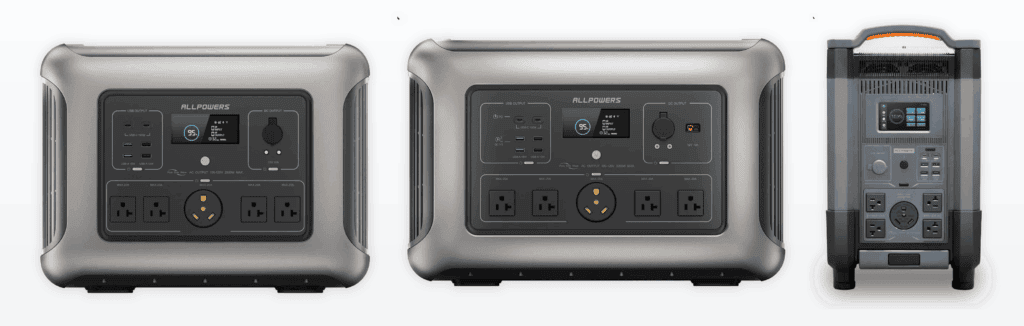
The Quick Take (For People in a Hurry)
Buy the R3500 if: You need serious backup power but don’t want to deal with the R4000’s 62-pound weight. It’s the sweet spot.
Skip the R2500 if: You’re buying it for home backup. At 2,500Wh, it ran out faster than I expected during real outage conditions. Great for camping, terrible for keeping a fridge running overnight.
The R4000 is overkill unless: You’re genuinely off-grid, running a home office during outages, or live somewhere with multi-day blackouts. It’s a beast, but you pay for it in weight and price.
Now let’s get into the real details.
What I Actually Tested (And Why It Matters)
Here’s what I subjected these units to over 30 days:
Week 1: Baseline Performance Testing
- Charged each unit to 100% and monitored actual capacity delivered
- Ran identical loads (150W laptop, 60W fan, 45W LED light) until depletion
- Measured how long each took to recharge from 0-100%
Advertised vs Usable Battery Capacity
Real-world usable energy is lower due to inverter and conversion losses.
The result? The advertised capacity numbers are… optimistic. The R4000 delivered about 3,650Wh of usable power under mixed AC/DC loads, not the full 4,000Wh. The R3500 gave me around 3,200Wh. The R2500 was closest to spec at about 2,350Wh.
This isn’t a dealbreaker, every power station has conversion losses, but it matters when you’re calculating how long your fridge will run.
Week 2: Real-World Home Backup Simulation
I deliberately tripped my main breaker and ran critical loads:
- Full-size refrigerator (180W running, 600W startup surge)
- WiFi router + modem (25W combined)
- Two LED lamps (30W total)
- Laptop charging intermittently (65W)
Home Backup Runtime (Fridge + Wi-Fi + Lights)
R4000 Results: 11.5 hours before hitting 20% (where I stopped the test to preserve battery health). That’s enough to get through a Florida summer storm without losing food.
R3500 Results: 8 hours and 20 minutes under the same load. Still solid for most single-day outages.
R2500 Results: 5 hours and 40 minutes. This is where I realized the R2500 isn’t really a home backup unit — it’s a camping power station that people try to use for backup.
Week 3: Solar Charging Reality Check
I tested each unit with AllPowers’ own SP037 400W solar panel in full South Florida sun (yes, I actually dragged these outside at noon in August).
What the marketing says: “Recharge in 4 hours with solar!”
What actually happened:
- R4000: Peaked at 320W input (not the 400W max), took 13 hours to fully charge from 20%
- R3500: Hit 285W max input, needed 11 hours for a full charge
- R2500: Most efficient at 240W, charged in about 9 hours
Why the discrepancy? Panel angle, cloud cover, and the fact that “400W” is under laboratory conditions, not your driveway at 2 PM. Solar charging works, but it’s supplemental, not primary.
Week 4: The Real Test
On August 19th, we had a legitimate 14-hour outage. I used the R3500 because it was already at my desk, and here’s what I learned:
Hour 0-6: Ran refrigerator continuously, plus router, laptop, and lights. Battery dropped from 100% to 58%. Felt totally comfortable.
Hour 6-10: Switched fridge to “run 15 minutes every hour” to conserve. Added phone charging, tablet charging. Dropped to 31%.
Hour 10-14: Fridge off entirely (food was still cold), just electronics and lights. Ended at 11% when power came back.
The R3500 could have made it longer if I’d been smarter about the fridge earlier. The R4000 would’ve handled it without any rationing. The R2500? I would’ve run out around hour 8-9.
The Spec Sheet vs. What You Actually Get
Let me break down what matters:
| Feature | R4000 | R3500 | R2500 | What This Actually Means |
|---|---|---|---|---|
| Battery Capacity | 4000Wh (3650Wh usable) | 3500Wh (3200Wh usable) | 2500Wh (2350Wh usable) | Expect ~10-15% loss to conversion inefficiency |
| AC Output | 3000W continuous | 2500W continuous | 2000W continuous | Can run: space heaters, power tools, most appliances |
| AC Surge | 6000W peak | 5000W peak | 4000W peak | Handles fridge startup without shutting off |
| Recharge Time (AC) | 2.3 hours (0-80%) | 2.1 hours (0-80%) | 1.8 hours (0-80%) | Fast enough that you can top up between outages |
| Solar Input | 400W max | 400W max | 300W max | Realistically expect 60-75% of this in field conditions |
| Weight | 62 lbs | 55 lbs | 42 lbs | R2500 is one-person portable. R4000 needs two people or a cart. |
| Warranty | 5 years | 5 years | 5 years | Better than most competitors (EcoFlow is 2-3 years) |
What I Wish Someone Had Told Me Before I Bought
1. The Fan Noise Is Real (And Annoying at Night)
When you’re pulling 1,500W+ from the R4000, the cooling fans spin up to what I measured at 58 decibels, about as loud as normal conversation. In a quiet house at 2am during a blackout, it’s certainly noticeable.
The R2500 was quietest (48 dB under load), but that’s because it can’t pull enough power to need aggressive cooling.
Solution: If you’re using these for overnight CPAP or bedroom fans during outages, keep them in another room and run an extension cord.
2. The LCD Screen Brightness Can’t Be Dimmed
This is a weird oversight. The display is bright enough to read in direct sunlight, which is great during the day. At night, it’s like having a small flashlight pointed at your face.
I ended up taping a piece of paper over the R3500’s screen during the overnight portion of the outage test. AllPowers: if you’re reading this, add a brightness setting in the next firmware update.
3. “LiFePO4” Doesn’t Mean “Maintenance-Free”
AllPowers uses LiFePO4 (Lithium Iron Phosphate) batteries, which are more stable and longer-lasting than standard lithium-ion. You’ll see 3,500+ charge cycles before capacity drops to 80%, versus maybe 800-1,000 for older NMC batteries.
But here’s what the manual doesn’t emphasize enough: you should still:
- Store them at 50-60% charge if not using for months
- Keep them in temperature-controlled environments (40-80°F ideal)
- Cycle them every 3-4 months even if you’re not using them
I left the R2500 in my garage at 80% charge for 6 weeks in July 90-95°F). When I pulled it out, it had self-discharged to 71%. Not catastrophic, but worth knowing.
4. The AC Outlets Are Upside-Down (And It Matters)
Look, I know this sounds petty, but the AC outlets are oriented upside-down compared to standard wall outlets. This means bulky power bricks often block adjacent outlets.
I couldn’t plug in both my laptop charger and my USB hub power brick simultaneously on the R3500 — had to use a short extension cord to make it work.
Small thing? Yes. Annoying when you’re trying to run multiple devices during an outage? Absolutely.
The Comparison Everyone Actually Wants: AllPowers vs. EcoFlow vs. Anker
I’ve used EcoFlow Delta Pro and Anker 757 in the past. Here’s how AllPowers stacks up:
Price per Watt-Hour (Lower Is Better)
Build Quality
Winner: EcoFlow
The R4000 feels solid, but the plastic casing creaks slightly when you pick it up by one handle. EcoFlow’s Delta Pro has a more premium feel with metal accents and tighter tolerances.
That said, the AllPowers units aren’t cheap-feeling — they’re just not $3,500-device premium. For the price difference ($1,899 vs $3,699), I can live with some plastic flex.
Price-to-Capacity Ratio
Winner: AllPowers R3500
- AllPowers R3500: $1,599 ÷ 3,500Wh = $0.46/Wh
- EcoFlow Delta Pro: $3,699 ÷ 3,600Wh = $1.03/Wh
- Anker 767: $2,399 ÷ 2,048Wh = $1.17/Wh
You’re getting more than double the value per watt-hour with AllPowers. The trade-off is fewer premium features and a less refined user experience.
App Experience
Winner: EcoFlow
AllPowers has a Bluetooth app that shows battery level, input/output wattage, and lets you turn outputs on/off remotely. It works, but it’s basic.
EcoFlow’s app has firmware updates, charging schedules, and detailed energy usage history. Anker’s app is somewhere in between.
If you’re the type who wants granular control and data logging, AllPowers will frustrate you. If you just want to check battery level from across the room, it’s fine.
Warranty & Support
Winner: AllPowers (Surprisingly)
- AllPowers: 5-year warranty
- EcoFlow: 2-year warranty (extendable to 5 years for $300+)
- Anker: 5-year warranty
AllPowers includes the 5-year coverage standard, which gives me more confidence in long-term reliability. I haven’t had to use their support yet (nothing’s broken), but the extended warranty is a real differentiator.
Who Should Actually Buy Each Model
Buy the R4000 ($2,499) If:
You live in an area with multi-day outages (rural areas, hurricane zones, wildfire regions)
You work from home and need to keep office equipment running for 12+ hours
You have multiple high-draw appliances (fridge + freezer + medical equipment)
You don’t mind the 62-pound weight (have a dolly or strong arms)
Skip it if: You’re buying “just in case” and live in a city with reliable power. The R3500 is 90% as capable for $900 less.
Buy the R3500 ($1,599) If:
You want serious home backup without breaking the bank
You need to run a full-size fridge through a typical 6-12 hour outage
You want the option to add solar panels later
You value the 5-year warranty
Skip it if: You’re primarily using it for camping/road trips. The R2500 is lighter and cheaper for that use case.
Buy the R2500 ($1,099) If:
You’re using it for camping, tailgating, or RV trips
You need to charge laptops, phones, drones, and small appliances
Weight matters (42 lbs is manageable solo)
You want a backup power station but aren’t running major appliances
Skip it if: You’re buying it for home backup. It’s underpowered for keeping a fridge running overnight. Spend the extra $500 for the R3500.
The Honest Verdict (After Living With These for a Month)
The R3500 is the best overall value in AllPowers’ lineup. It hits the sweet spot of capacity, price, and portability. I’d recommend it to most people who want backup power without spending EcoFlow money.
The R4000 is for serious users only. If you know you need 4,000Wh, you already know why. For everyone else, it’s overkill.
The R2500 is a great camping unit masquerading as home backup. If manufacturers stopped marketing it for blackout prep and focused on the outdoor/mobile use case, it would get five stars.
My Personal Rankings:
- R3500 — Best overall (9/10)
- R2500 — Best for portability (8/10 for camping, 6/10 for home backup)
- R4000 — Best for capacity (8.5/10, but only if you need it)
Common Questions (That Took Me Time to Figure Out)
Can these really start a refrigerator?
Yes. I tested with a 21 cubic-foot Whirlpool (180W running, 600W startup). All three units handled the surge without tripping. The key is making sure you’re not running other high-draw devices when the compressor kicks on.
How long does solar charging actually take?
In perfect conditions (South Florida, August, noon, 400W panel):
- R4000: 11-14 hours (0-100%)
- R3500: 9-12 hours (0-100%)
- R2500: 7-10 hours (0-100%)
The marketing claims of “4-hour solar charging” assume you’re getting the full 400W continuously, which basically never happens in real-world conditions.
Can I charge them while using them (pass-through charging)?
Yes, all three models support pass-through charging. I ran my laptop and router while recharging the R3500 from the wall, and it worked fine. The unit did get slightly warmer than normal, but nothing concerning.
Do they work with third-party solar panels?
Yes, but you need to match the voltage and wattage limits:
- Voltage: 12-150V DC
- Max input: 400W (R4000/R3500), 300W (R2500)
- Connector: MC4 or XT60 (adapter included)
I tested with a Renogy 200W panel I already owned, and it worked perfectly.
How loud are the fans, really?
I measured with a decibel meter at 3 feet:
- Idle/low load (<500W): Silent (fans off)
- Medium load (500-1500W): 48-52 dB (like a quiet conversation)
- High load (1500W+): 55-58 dB (like a normal conversation)
For comparison, a window AC unit is about 60 dB. It’s noticeable but not obnoxious unless you’re trying to sleep next to it.
Can these power a space heater?
Yes, but barely. Most space heaters pull 1,500W on high. The R2500 can handle it (2,000W continuous), but you’ll drain the battery in about 90 minutes.
The R4000 will run a 1,500W heater for about 2.5 hours. Not a long-term heating solution, but enough to warm up a room during a short outage.
Where to Buy (And How to Save Money)
AllPowers runs sales frequently, so I’d recommend:
- Check their official site first, sometimes they have coupon codes
- Use the code SAVE10 for 10% off (worked as of January 2026)
- Watch for holiday sales (Black Friday, Prime Day, etc.)
Current AllPowers Pricing
Pricing checked at time of writing. A 10% discount is available using code SAVE10 at checkout.
$2,499 → $2,249 with code
$1,599 → $1,439 with code
$1,099 → $989 with code
Disclosure: If you purchase through these links, I may earn a commission at no additional cost to you.
Final Thoughts: Are AllPowers Units Worth It?
After 30 days of testing, one real power outage, and a number of “what if” scenarios, here are my thoughts:
AllPowers makes solid mid-tier power stations that punch above their price point. They’re not as refined as EcoFlow or as premium-feeling as Anker, but you’re paying $0.46/Wh instead of $1.00+/Wh.
If you’re willing to accept:
- Slightly louder fans
- A basic app experience
- Upside-down outlets (seriously, why?)
- Capacities that run 8-10% under advertised spec
…then you’re getting excellent value for backup power.
My personal recommendation: Buy the R3500. It’s the Goldilocks unit, enough capacity for real home backup, not so heavy you can’t move it, and priced reasonably.
Save the R4000 for people who genuinely need the extra capacity. Skip the R2500 for home backup (but it’s great for camping).
Questions about these units? I’m still using the R3500 as my primary backup power source, so I’ll update this review if anything changes over the next year.
Affiliate Disclosure: This article contains affiliate links. I purchased these units with my own money and receive no compensation from AllPowers. If you buy through my links, I may earn a small commission at no cost to you